


Pocket Prep EMS 2026
4.5454.00 Reviews
App Specs
- Version
- 3.29.1
- Updated On
- License
- Free
- Downloads
- 100,000+
- Developer
- Pocket Prep, Inc.
- Categories
- Education
- Platform
- Android
Screenshots
 Analysis by AppCompare
When I used Pocket Prep EMS 2026 to think through how an EMS study routine might work, the biggest question was not whether practice questions could help. It was how to use them without turning short study sessions into a pile of disconnected scores. This education app from Pocket Prep, Inc. is built around exam preparation, and I find it most useful when I treat each quiz as a prompt to understand a topic rather than a prediction of how I will perform on test day.
Where study sessions can get stuck
EMS learners often have to fit revision around classes, work, clinical responsibilities, or family life. That makes a quick quiz appealing, but it can also create a trap: answering questions whenever there is a spare minute without leaving time to review the reasoning. In my view, the explanations matter more than the rush of completing a session. If I miss a question, I would pause long enough to identify the underlying idea I misunderstood, then return to that topic later instead of immediately chasing a better score.
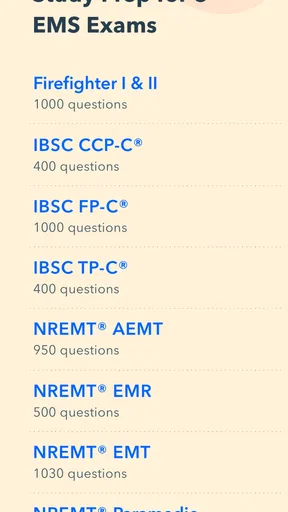
Another point of friction is deciding what to study. The app covers preparation for nine EMS certification exams, so it is aimed at people with a specific exam path in mind, not anyone casually curious about emergency medicine. Before starting, I would identify the certification I am preparing for and keep my practice tied to that goal. A broad run through questions can feel productive while still spending too much time on material that is not the priority for my particular exam.
It also helps to separate confidence from readiness. A familiar question may become easier after repetition, but that does not automatically mean I can explain the concept or apply it in a different scenario. I would use practice results as a way to find weak areas, not as a guarantee of passing. That distinction is especially important for EMS, where learning the reasoning behind an answer is more valuable than recognizing a pattern.
Checks I would make before relying on it
The app is free to download, but it includes in-app purchases priced from $15.99 to $95.99 per item. I would look at the available access options inside the app before building a long-term plan around a paid level. The free starting point is useful for deciding whether the question-and-review format suits me; I would only spend money after checking that the content and access offered fit my exam timeline and study needs.
Compatibility is another simple check worth doing early. The current version is 3.24.5, and the minimum operating system is Android 8.0. I would confirm that my device meets that requirement and install the app while I have a reliable connection, rather than waiting until a short break before a study session. If something does not load as expected, I would first check the connection, close and reopen the app, and make sure it is up to date before assuming the study material itself is the problem.
The age rating is Everyone, but the intended audience is still quite specific: people preparing for EMS certification exams. The app has a 4.6 average from around 2.8 thousand ratings, which is a useful sign that many users have found it worthwhile, but it is not a substitute for checking whether its approach matches my own course materials. I would keep my instructor’s guidance and the official exam outline at the center of my plan.
Worth Reading Before You Choose

EA SPORTS FC Mobile 26 Is a Bigger Football Game, but It Takes Time

Flipboard Shows What News Apps Must Do Beyond the Feed

Switching to Android Auto Means Rethinking Your Driving Routine

Google Calendar Makes a Crowded Week Easier to Manage

Ludo King Makes the Most of the Minutes Between Plans

Baby Panda World Brings Quick Play to Modern Phones, but Its Game Library Feels Busy
Making the question-and-explanation loop work
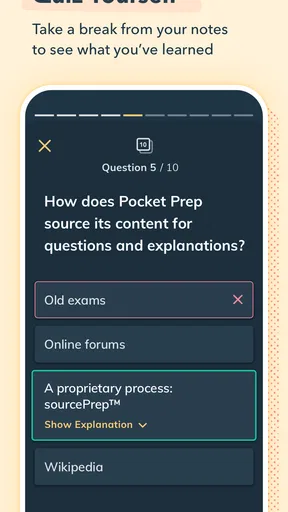
A practical routine is to do a modest set of questions, review every explanation, and write down only the concepts that need another pass. That keeps the app from becoming a scoreboard. I would revisit missed topics after a gap rather than immediately repeating the same questions; a little distance makes it easier to tell whether I understand the concept or merely remember the answer.
For example, after a class or shift, I might use a short break to answer a focused set of questions, then spend a separate session reviewing the explanations. If a question exposes a gap, I would compare the idea with my course notes and mark it for a longer study block. That workflow uses the app for quick retrieval practice while keeping deeper learning connected to the materials and instruction that shape my exam preparation.
The mock-exam approach is most useful when I can give it my attention. I would save a longer practice session for a quiet period, not squeeze it into a noisy commute or an interrupted break. In contrast, brief question sessions suit small windows of time. This distinction helps me use limited study time deliberately: quick recall when time is short, more careful review when I can concentrate.
Recovering when progress feels uneven
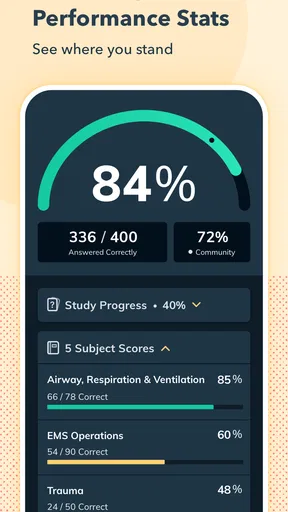
If my progress seems to stall, I would first look at the pattern of mistakes rather than simply doing more questions. Repeated misses in one area suggest a study topic to revisit; scattered errors may call for slower reading or more careful review of explanations. A dashboard can make progress visible, but I would treat it as a planning aid, not a verdict on my ability.
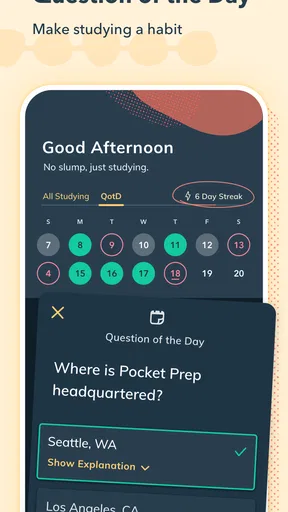
Reminders can help establish a habit, though they cannot decide when I am ready to study. I would choose a routine that is realistic for my week and keep sessions small enough to complete with attention. If a reminder arrives during work or class, I would let it pass and return at a time when I can actually focus. Consistency matters more than responding to every nudge.
For interruptions or loading trouble, I would avoid repeating a purchase or tapping through the same action several times. First I would check whether the connection is stable, restart the app, and confirm the installed version. If the issue continues, I would use the app’s available support route rather than guessing at a fix. Those basic checks are sensible for most study apps and do not require assuming a particular technical fault.
When another resource is the better fit
Compared with a textbook or a full course, Pocket Prep is designed for practice in shorter bursts. That is convenient, but question practice alone is not a complete EMS education. A textbook can be better when I need a slower explanation of a broad subject, while an instructor or course is better for feedback, discussion, and hands-on learning. I would use this app as a supplement, not as a replacement for practical training or the materials required by my program.
It may also be the wrong choice if I am not preparing for one of the certification exams it supports, if I prefer long-form lessons to questions, or if I need a resource tailored to a particular class. In those cases, my course materials or a dedicated class resource should lead. On the other hand, learners who already have instruction and want a portable way to check recall may find the format a natural addition.
There is a trade-off in any question bank: practice can reveal gaps, but repeated exposure may make answers feel familiar before the underlying knowledge is secure. I would avoid using a high score on a repeated set as my only measure of readiness. Explaining why an answer is right, and why the alternatives do not fit, is a better test of whether I have learned something I can carry into a new question.
First Impressions
When I first downloaded Pocket Prep EMS 2026, I was skeptical. I mean, can an app really prepare you for such a high-stakes exam? But right off the bat, the clean and user-friendly interface had me intrigued. It’s not cluttered, which is a relief for someone like me who can get overwhelmed with too many options.
Features That Stand Out
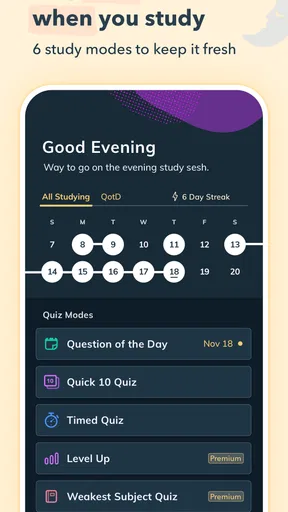
The app offers a plethora of features that make it a must-have for EMS students. One of the coolest features is the customizable practice tests. You can tailor these tests to focus on specific areas where you feel rusty. It's like having a personal tutor who knows exactly what you need.
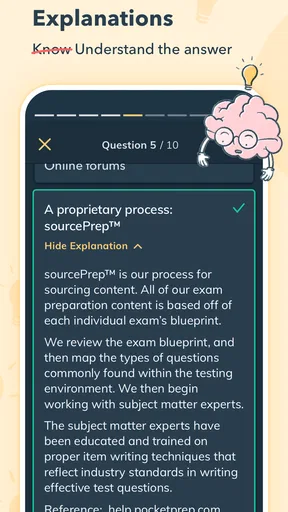
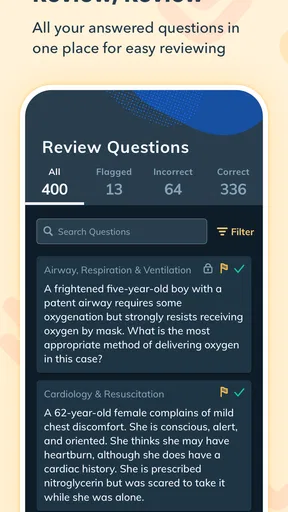
Another feature that I found super helpful is the detailed explanations for each question. It doesn’t just tell you what you got wrong but actually takes the time to explain why. This is crucial for understanding the material and not just memorizing it.
Plus, the daily study reminders are a godsend. If you're anything like me, you’ll appreciate the gentle nudge to keep on track. It's like having a study buddy who's always got your back.
Performance Tracking
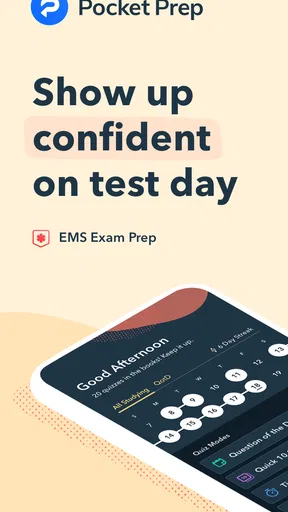
The app also comes with a performance dashboard that tracks your progress. Seeing a visual representation of your improvement is not only motivating but also incredibly satisfying. It’s like watching your own success story unfold, one quiz at a time.
Access Anywhere, Anytime
Whether you're on the bus, in line at the grocery store, or lounging at home, Pocket Prep lets you study anytime, anywhere. This kind of flexibility is a game-changer for those of us with hectic schedules. It turns every idle moment into a productive one.
Community Support
One unexpected bonus is the sense of community. The app connects you with other EMS students, allowing you to share tips, ask questions, and even commiserate over tough topics. It's like being part of a secret club where everyone speaks your language.
Who will get the most from it
I see the strongest fit for a learner who already knows which EMS certification they are pursuing and wants regular, question-led revision between classes or study blocks. The app’s practice format gives that person a concrete way to check recall, while explanations can turn a wrong answer into a prompt for further reading. It is less suited to someone starting from scratch who expects an app to teach every subject from the ground up.
A realistic everyday use would be a student with a busy schedule who finishes a lecture, has a brief wait before the next commitment, and uses that time for a focused practice set. Later, at home, they can revisit the questions that exposed uncertainty and check those points against their notes. The useful part is not squeezing study into every spare second; it is separating quick recall from thoughtful review so neither becomes rushed.
People deciding whether to pay should also consider how often they will use the app and whether the available purchase level lines up with their plan. I would try the free experience first, then decide based on the actual practice and explanations I can access. That avoids paying simply because an exam is approaching, when a course resource or a more structured study plan may be the better next step.
Although the catalog describes the app as available for Android and iOS, the minimum OS listed here is Android 8.0. I would check the requirements for the specific device and platform I plan to use before depending on it for a study schedule. The app is rated Everyone, and it has passed 100 thousand installs, but neither broad availability nor popularity guarantees that its content is the right match for an individual course.
Final Thoughts
So, is Pocket Prep EMS 2026 worth the download? Absolutely. Whether you're just starting your EMS journey or need a refresher before the big day, this app is an invaluable resource. It's not just about passing an exam; it's about building confidence and competence in your EMS knowledge.
In a world where information overload is real, having a focused and effective study tool is crucial. Pocket Prep EMS 2026 delivers on that front, making it a must-have for anyone serious about acing their EMS exam. So go ahead, give it a whirl, and watch your confidence soar as you conquer those practice tests with ease.
My practical verdict
My recommendation is conditional rather than automatic: I would choose it for focused exam practice alongside a sound course or study plan, especially when short sessions are easier to fit into the day than long reading blocks. I would skip it as a sole source of instruction, and I would not treat a dashboard or practice score as proof that I am ready. The app’s value depends on reviewing explanations and following up on weak areas.
Pocket Prep EMS is free to begin, with optional in-app purchases, and it is an education app from Pocket Prep, Inc. The current version is 3.24.5. For a learner who wants a portable question-based companion and is prepared to pair it with deeper study, that is a practical combination. If I needed teaching, hands-on feedback, or a resource matched closely to a particular class, I would put those options first and use this app only if it complements them.
Pros
- User-friendly interface for easy navigation.
- Comprehensive study materials included.
- Customizable practice tests enhance learning.
- Detailed explanations for each answer.
- Offline access for studying on the go.
Cons
- Limited free content; subscription needed.
- Occasional app crashes reported by users.
- Some questions may seem too easy.
- Lacks interactive study games.
- Requires regular updates for best use.
FAQs for Pocket Prep EMS 2026
What is Pocket Prep EMS 2026, and who is it for?
Pocket Prep EMS 2026 is a mobile application designed to help users prepare for the Emergency Medical Services (EMS) certification exams. It is ideal for aspiring EMTs, paramedics, and other emergency service professionals who need to review and test their knowledge on-the-go. The app provides practice questions, detailed explanations, and customizable study options.
How does Pocket Prep EMS 2026 enhance my study routine?
Pocket Prep EMS 2026 enhances your study routine by offering a flexible, mobile-first approach to exam preparation. It includes a vast library of practice questions with detailed rationales, allowing you to learn from your mistakes. The app also features customizable quizzes that let you focus on specific areas, helping you manage your study time efficiently.
What types of questions are included in Pocket Prep EMS 2026?
The app includes a wide range of practice questions that cover various topics relevant to EMS certification exams. These questions are designed to mimic the style and difficulty of the actual exam, complete with detailed explanations to help you understand each answer. This ensures comprehensive coverage of key concepts and areas you need to master.
Is Pocket Prep EMS 2026 compatible with both Android and iOS devices?
Yes, Pocket Prep EMS 2026 is available for both Android and iOS devices. This cross-platform compatibility ensures that you can study anytime, anywhere, regardless of your device. You can easily download the app from the Google Play Store or the Apple App Store and start preparing for your EMS certification exam immediately.
Does Pocket Prep EMS 2026 offer any progress tracking features?
Absolutely, Pocket Prep EMS 2026 includes robust progress tracking features. It allows you to track your performance and improvement over time through detailed analytics and statistics. This helps you identify your strengths and weaknesses, enabling you to focus your study efforts more effectively and improve your exam readiness.


